Scripted TCP/IP Custom Network Alerting
Action
This component can be used as both a monitoring entry as well as an
alerting action which means that TCP accessible devices which accept telnet
or raw TCP connections to perform certain actions can be access and scripted
as an alerting action.
The IPSentry Scripted TCP/IP Network Monitoring enhances the basic TCP
Network monitoring functionality by providing a scripted approach to send
and receive requirements over an established TCP/IP connection.
In using the basic TCP Network monitoring functionality provided in the base
IPSentry application, you are provided with the ability to connect, send
some data and/or expect a specific amount of data. In contrast, when you
utilize the Scripted TCP/IP Network Monitor (and alert) add-in, you can
extend this to complete an entire session and test all aspects of an RFC
compliant or proprietary TCP system.
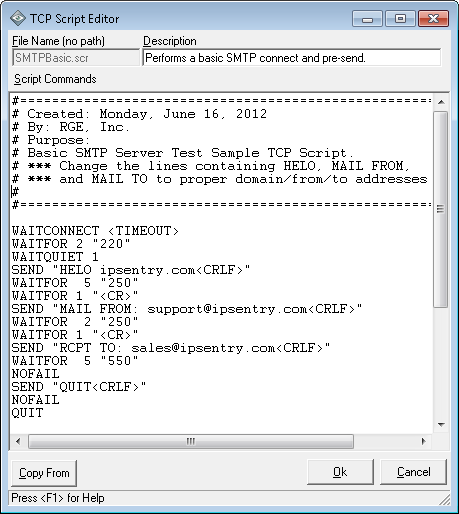
For example, the basic monitor will connect to an SMTP server and test to
see if the appropriate SMTP response is received. With this add-in however,
you can actually script out the entire sequence of events that are required
to send an email message through the server.
The add-in is also very useful for proprietary TCP implementations which may
require non-standards based inputs and outputs, proprietary TCP devices, and
any other area where a simple Send and Receive dialogue of TCP is required.
An example of this type of use might be communicating via telnet session to
a local device such as a router to perform a soft reset via system command
after login by simply defining the host to which you will connect, port
number, and then the scripted dialogue of Send/Wait commands.
Once again, this is for the power-user adding a lot more power than the
basic TCP/IP network monitoring functionality in the IPSentry base
application. This add-in expands on the simple Send/Receive functionality
required to monitor most TCP connections by allowing a full session
dialogue. With this add-in, you can script logins to POP3 servers, send test
or heartbeat SMTP messages, login to FTP servers, or virtually any other
clear-text top based dialogue over a raw TCP connection. We have included
sample scripts to get you started for such items as POP3 login, SMTP test
just up to the point of sending, and an FTP login and directory change. This
add-in is not for the faint of heart but that's hardly worth mentioning
because neither is running and maintaining an IT infrastructure...

Evaluate this feature in the fully functional
download.
See
more details in our help
documentation.
Already running IPSentry? Purchase this add-in license
here



 Back
Back