2/32
 |
|
|
|
Standard Network Monitoring
|
|
|
|
|
|
|
Network Latency and Connectivity
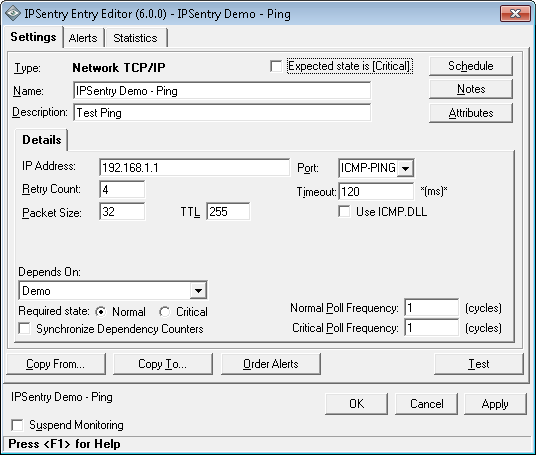
With the basic IPSentry TCP/IP Network monitoring functionality, you can
monitor latency via ICMP/Ping and Connectivity to various TCP/IP servers
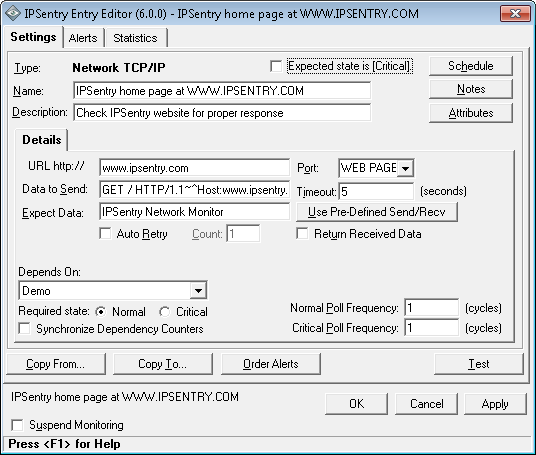
using a Connect/Send/Expect dialogue test.
While the basic Ping monitor is useful for preliminary connectivity testing,
many routers and firewalls are now disregarding ping request packets. This
leaves you with a requirement to connect directly to the remote host to
validate connectivity.
With this functionality, you can monitor Web pages, web servers, standard
TCP ports such as HTTP, FTP, POP3, SMTP, and even custom TCP ports for
connectivity as well as proper response.
For example, instead of just pinging your web server or simply connecting to
port 80, IPSentry will request the page specified and check the response to
ensure that the expected data is being received within the timeframe
specified.
IPSentry provides pre-configured Send / Expect settings for several
different standard TCP ports.

Evaluate this feature in the fully functional
download.
See
more details in our help
documentation.


 Back
Back