Performance Counter
Value Monitoring
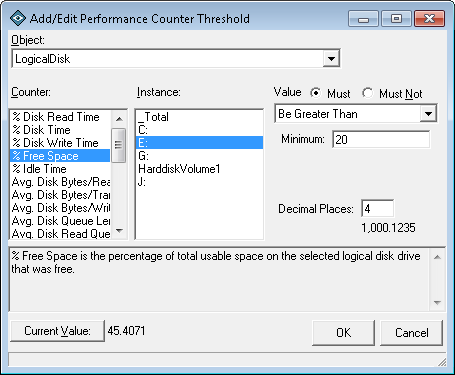
The IPSentry Performance Counter Monitoring add-in provides you with the
ability to evaluate performance counter data values against a user defined
threshold to detect values which exceed thresholds, change abruptly,
increase or decrease unexpectedly or by more than a defined threshold.
Some uses of the add-in include testing Exchange mail queue sizes for high
watermark thresholds or abrupt increases in size of the queue, drive space
percentages, CPU utilization, and etc...
This add-in monitors local and remote computers performance data, so you can
centralize your alerting, charting, and graphing of values onto the IPSentry
machine.
Use of this add-in is generally utilized to test the following aspects of
performance data values.
- The host being monitoring is accepting connections.
- The counter values are accessible.
The values are then compared against your filters which may include
whether or not:
- Value is Equal To a specific value
- Value is Greater than a specified value
- Value is Less than a specified value
- Value has Changed
- Value has Increased
- Value has Decreased
- Value is Within a specified range
- Value has Increased by more than a specified value.
- Value has Decreased by more than a specified value.
- Value has Changed by more than a specified value.
Each of the above can be compared for both positive or inverse matches.
If the returned value is out your specified threshold, the configured alerts
associated to this entry will be triggered.
The windows performance data is loaded with useful system performance
information.
Obviously, we could include just about every valuable counter we can think
of and market IPSentry has having hundreds upon hundreds of monitoring types
and features.
The fact is, monitoring performance data is just one feature of network
monitoring whether you are monitoring CPU, Memory, Disk Space, Exchange
Services, SQL Services, AD Processes, Network Services, etc... What objects,
counters and instances that you monitor is entirely up to you.

Evaluate this feature in the fully functional
download.
See
more details in our help
documentation.
Already running IPSentry? Purchase this add-in license
here



 Back
Back